On this page
Directives
Callouts, steps, code tabs, cards, figures, FAQ, glossary and inline elements, each with its syntax and the result.
Directives extend Markdown with components. A container directive starts with three or more colons and a name on its
own line, and ends with a line of the same number of colons. A leaf directive (::card, ::figure, ::snippet) is one
line with two colons. Inline directives start with one colon.
Each section below shows the source, then what it renders.
Unknown block directives fail the build. A typo such as :::notes stops check and build with the file name and the list of known directives. An unknown
inline directive is kept as text, so ratio 3:2 stays as written.
Callouts
Four kinds, each with an alias:
| Directive | Alias | Tone |
|---|---|---|
:::note |
:::info |
Information |
:::tip |
:::success |
Positive |
:::warning |
:::caution |
Warning |
:::danger |
:::error |
Error |
The label in brackets becomes a bold lead at the start of the first paragraph. {title="..."} does the same.
:::note[Before you start.]
You need an API key with write access.
:::

:::danger{title="Irreversible."}
Deleting a queue drops every job in it.
:::Before you start. You need an API key with write access.
Irreversible. Deleting a queue drops every job in it.
Steps
Wrap ## headings in ::::steps to number them. Everything between two headings belongs to the step above. Use four
colons, so the container can hold fenced code and other directives.
::::steps
## Install the CLI

```terminal
$ npm install -g rocket-cli
```

## Log in

Run `rocket login` and paste your key.
::::1. Install the CLI
$ npm install -g rocket-cli2. Log in
Run rocket login and paste your key.
The step headings appear in the table of contents like other ## headings.
Code tabs
:::code-group turns its fenced blocks into tabs. The reader's choice is remembered across the site, so picking Go on
one page shows Go on the next one. Set the tab label with label="..." and a file name with title="..." in the fence
line.
:::code-group
```go title="main.go" label="Go"
client := rocket.New(os.Getenv("ROCKET_KEY"))
```

```typescript title="index.ts"
const client = new Rocket(process.env.ROCKET_KEY);
```
:::client := rocket.New(os.Getenv("ROCKET_KEY"))const client = new Rocket(process.env.ROCKET_KEY);Without label, the tab shows the language name. See Code blocks for single blocks and terminal
sessions.
Link cards
::card is a leaf directive inside :::cards. href is required; relative links to Markdown files become page URLs.
:::cards
::card[Frontmatter]{href="./frontmatter.md" description="Fields at the top of a page."}
::card[Code blocks]{href="./code-blocks.md" description="Languages, file names and terminals."}
:::Feature cards
:::feature is a container with an icon, a title, Markdown content and an optional link. Put feature cards inside
::::cards (four colons, since they contain three-colon containers).
::::cards
:::feature[Search]{icon="search" href="../features/search.md" link="How search works"}
A Pagefind index built with the site.
:::

:::feature[Themes]{icon="palette"}
Accent, grays, radius, header and code colors per project.
:::
::::Themes
Accent, grays, radius, header and code colors per project.
icon is a Lucide icon name, for example book-open; it defaults to circle. The link
shows only when both href and link are set.
Icon names are checked in build only. An unknown icon name passes docsp check and fails docsp build.
Procedure
:::procedure renders a numbered list as product steps, for end-user guides. Each item is **Title** followed by
text. The text is plain: links and formatting in it are dropped.
:::procedure
1. **Open the settings** Choose the gear icon at the top right.
2. **Add a channel** Choose Email, then enter the sender address.
3. **Send a test** Check the inbox of the sender address.
:::- Open the settingsChoose the gear icon at the top right.
- Add a channelChoose Email, then enter the sender address.
- Send a testCheck the inbox of the sender address.
Figure
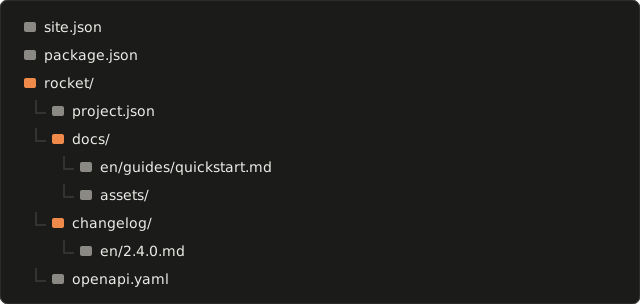
::figure shows an image with a caption, and an optional second image for dark mode. Paths are relative to the
Markdown file.
::figure{src="../../assets/layout-light.svg" dark="../../assets/layout-dark.svg" alt="Folders of a docsp project" caption="Folders of one project."}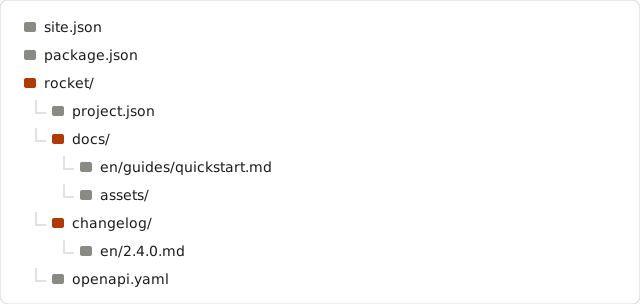
| Attribute | Required | Value |
|---|---|---|
src |
yes | Image for light mode, or for both modes without dark. |
dark |
no | Image for dark mode. |
alt |
no | Text alternative. Defaults to the label in brackets. |
caption |
no | Caption under the image. Defaults to the label in brackets. |
width, height |
no | Intrinsic size, to reserve space before the image loads. |
::figure[Folders of a docsp project]{src="..."} uses the label as both alt and caption.
FAQ
:::faq turns each ### heading into a question you can expand; the content up to the next heading is the answer.
:::faq{open} expands the first answer.
:::faq{open}
### Can I use my own domain?
Yes. Serve the site at the root of the domain.

### Does search need a server?
No. The index is static files in `dist/pagefind/`.
:::
Can I use my own domain?
Yes. Serve the site at the root of the domain.
Does search need a server?
No. The index is static files in dist/pagefind/.
Glossary
:::glossary renders a list of **Term**: definition items. The definition is plain text.
:::glossary
- **Section**: a tab of a project, and a folder of its pages.
- **Locale**: a language of the content, such as `en` or `pt-BR`.
:::- Section
- a tab of a project, and a folder of its pages.
- Locale
- a language of the content, such as en or pt-BR.
Inline elements
Inline directives sit in running text.
:kbd[Ctrl]is a key: press Ctrl + K to search.:ui[Settings > Channels > Email]is a path through the interface, with>between the parts: open SettingsChannelsEmail.:badge[Beta]{tone="info"}is a badge: Beta. Tones areok,warn,err,infoandneu(the default).
Tables
Tables are GitHub Flavored Markdown. docsp wraps each one in a bordered frame that scrolls sideways on narrow screens and can be reached with the keyboard.
| Plan | Jobs per month |
|---|---|
| Free | 10,000 |
| Team | 1,000,000 || Plan | Jobs per month |
|---|---|
| Free | 10,000 |
| Team | 1,000,000 |
Keep directives and relative links out of tables. docsp does not process the content of table cells: an inline directive in a cell renders as plain text in a block,
and a relative link to a Markdown file is not turned into a page URL. Use absolute links (/rocket/guides/quickstart/)
in tables, or move the link to the text around the table.
Code from the source tree
::snippet shows lines of a file from the project's source checkout, with every name linked to the symbol a compiler
resolved. It needs a symbols block in project.json; without one, the build fails.
::snippet{file="src/ffi.rs" lines="140-170"}
::snippet{file="src/ffi.rs" region="bump" title="The C entry point"}| Attribute | Value |
|---|---|
file |
Path relative to the top folder of the source checkout. |
lines |
A line or a range, 12 or 12-40. |
region |
The lines between a docsp:region <name> comment and the matching docsp:endregion comment. Regions nest. |
title |
Header of the block. Defaults to the file path. |
This site has no symbol index, so it shows no live snippet. The spark project of the example site in the docsp
repository has one: examples/site/spark/docs/en/guides/counter.md. See Symbol index.